
GitLab Release 16.0 블로그 포스트
 Grace
Grace
오늘 우리는 GitLab 16.0 출시 소식을 발표해서 기쁩니다. 이번 업데이트에서는 Value Streams 대시보드 기능을 정식 출시했습니다. 아울러 Linux에서 GPU 지원 SaaS 러너를 사용할 때, GitLab으로 워크로드를 원활히 지원하도록 구축했습니다.
코멘트 템플릿 기능과 특정 브랜치만 미러링하는 기능도 추가했습니다. 또 Web IDE를 GitLab 전체에 기본 multi-file 코드 편집기로 선보였습니다. 이밖에 프로젝트 수준의 Value Stream Analytics에 Overview stage, Custom value streams를 만드는 옵션도 추가했습니다.
위 내용은 이번 릴리즈에서 선보인 55개 이상의 개선 사항 중 몇 가지 주요 사항입니다. 아래에 주요 업데이트 내용을 모두 확인하세요. 다음 달 릴리즈 내용을 미리 보려면 16.1 릴리즈 킥오프 비디오가 있는 예정 릴리즈 페이지를 보세요.
Value Streams 대시보드 정식 출시
Ultimate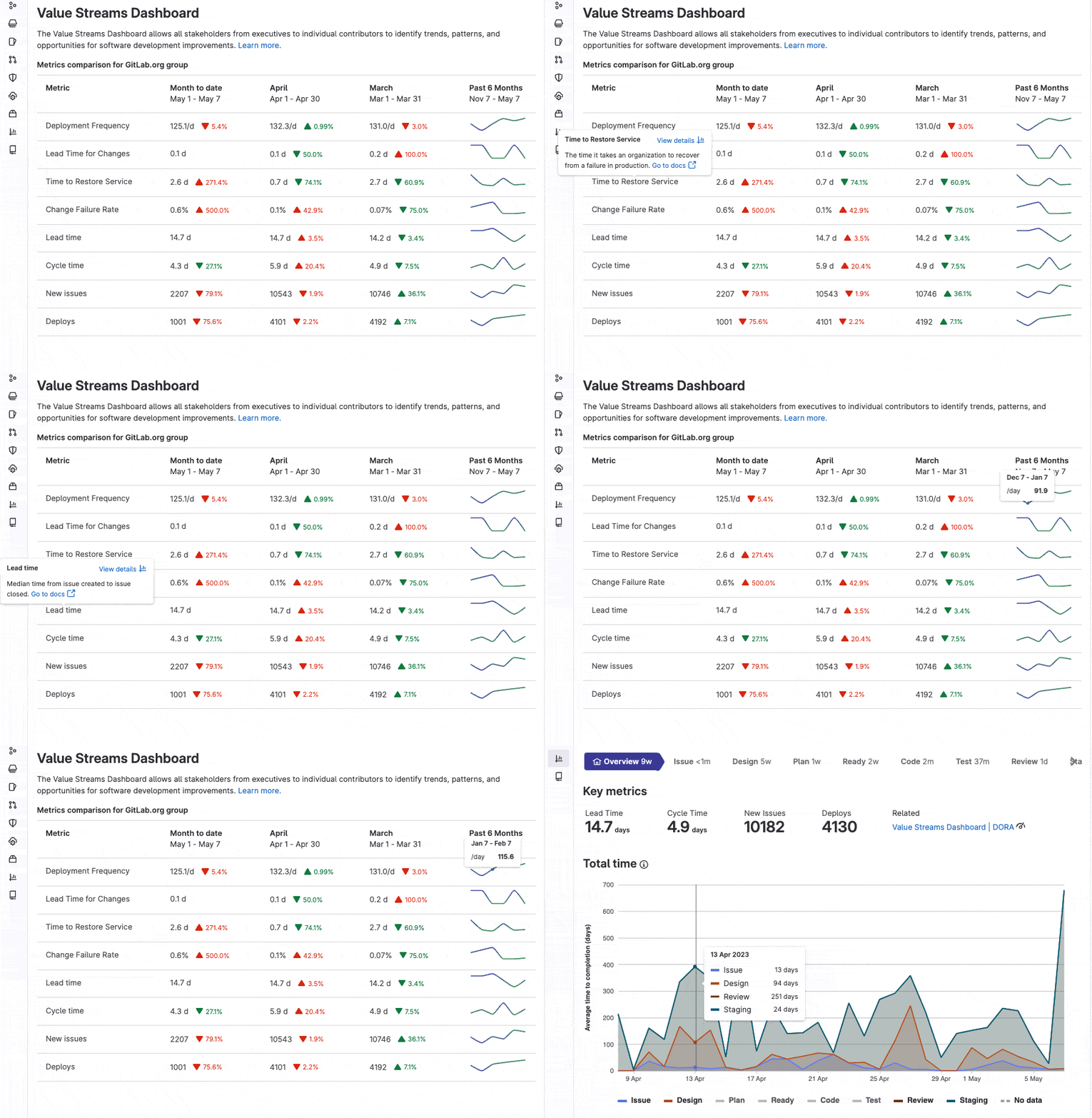
이
조직은 Value Streams 대시보드를 사용해 일정 기간 이러한 메트릭을 추적, 비교할 수 있습니다. 또 하락 추세를 조기에 파악하고, 보안 노출을 이해할 수 있습니다. 이밖에 개별 프로젝트 또는 메트릭에 드릴 다운*해 개선 조치를 취할 수 있습니다.
이 포괄적 뷰는 통합 데이터 저장소가 있는 단일 애플리케이션으로 구축됐습니다. 이 뷰를 사용하면 경영진부터 개별 기여자까지 모든 이해관계자가 서드파티 도구를 사거나 이를 유지 관리할 필요 없이 소프트웨어 개발 라이프사이클을 파악할 수 있습니다.
*드릴 다운: 더 많은 정보를 찾기 위해 관련 텍스트나 아이콘 등을 클릭해 마치 뚫고 들어가듯이 검색하는 것
Linux에서 GPU 지원 SaaS 러너 사용
PremiumUltimate(SaaS Only)

우리는 GitLab 러너 안에서 더 강력한 컴퓨팅 하드웨어를 제공해 DevSecOps의 모범 사례를 데이터 사이언스에 가져오려고 합니다. 이전에는 데이터 사이언티스트들이 컴퓨팅 집약적 워크로드를 가졌을 수 있습니다. 그 결과, job은 GitLab에서 빠르게 실행되지 않았을 수 있습니다.
이제 Linux에서 GPU 지원 SaaS 러너를 사용하면, GitLab.com으로 이러한 워크로드를 원활하게 지원할 수 있습니다.
지금 바로 새로운 러너를 체험해 보고, 이 이슈에 의견을 알려주세요. 여러분의 피드백을 듣고 싶습니다!
코멘트 템플릿
FreePremiumUltimate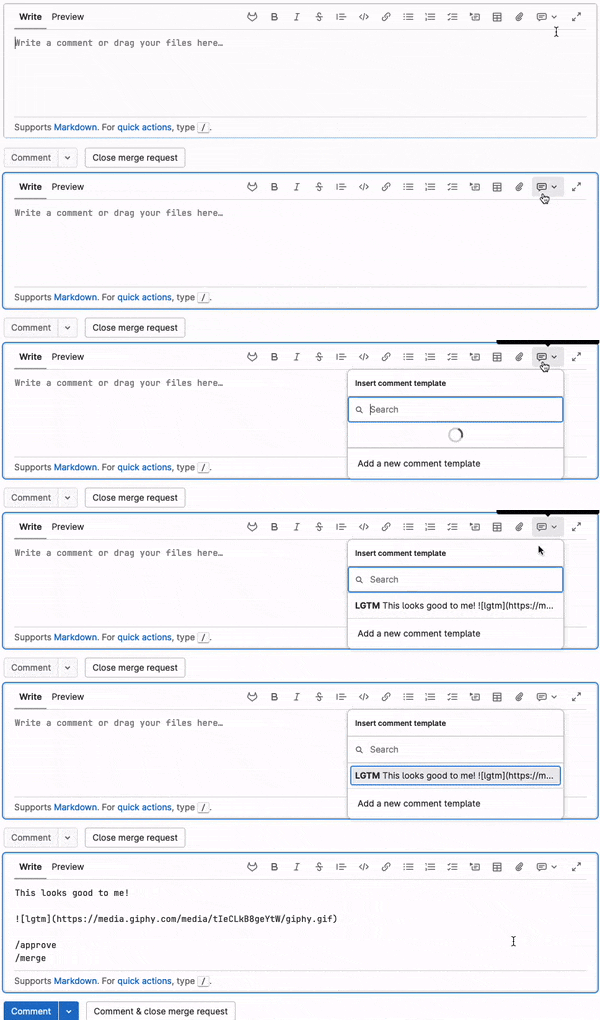
여러분은 이슈, 에픽 또는 merge request에서 코멘트할 때, 같은 코멘트를 반복해서 작성해야 할 수 있습니다. 아울러 버그 리포트에 더 많은 정보를 항상 요청해야 할 수도 있습니다. 또 여러분은 분류 프로세스의 일환으로 빠른 조치를 통해 레이블을 적용하고 있을 수 있습니다. 혹은 재미있는 gif나 적절한 이모지로 모든 코드 리뷰를 마무리하고 싶을 수도 있습니다. 🎉
코멘트 템플릿은 GitLab의 코멘트 상자에 적용할 수 있는, 저장된 응답을 만들어 워크플로 속도를 높이도록 지원합니다. 코멘트 템플릿을 만들려면, User settings > Comment templates로 이동한 다음, 템플릿을 작성합니다. 템플릿을 저장한 뒤, 텍스트 영역에서 Insert Comment template 아이콘을 선택하면, 저장한 응답이 적용됩니다.
이는 응답을 표준화하고 시간을 절약하는 좋은 방법입니다!
특정 브랜치 미러링
PremiumUltimate
브랜치가 많고, 복잡한 리포지터리를 미러링해야 하는데 그중 브랜치 단 몇 개만 필요한가요? 필요한 브랜치와 일치하는 정규 표현식을 만들어 미러링하는 브랜치 수를 제한하세요.
이전에는 미러링하려면 전체 리포지터리 또는 모든 protected 브랜치를 미러링해야 했습니다. 이 새로운 유연성은 미러가 push 또는 pull하는 데이터 양을 줄이고, 민감한 브랜치를 공개 미러에서 제외할 수 있습니다.
새로운 웹 IDE 정식 출시
FreePremiumUltimate
이 기능을 도입한 이후, 우리는 Web IDE의 사용성, 성능, 안정성 작업을 반복해 왔습니다. 이로써 원격 개발 워크스페이스, 코드 제안과 같은 기능을 강력한 기반 위에 구축할 수 있었습니다.
우리는 Web IDE 베타와 관련해 압도적으로 긍정적인 피드백을 받았습니다. 아울러 GitLab 16.0부터 Web IDE를 GitLab 전체에 기본 multi-file 코드 편집기로 만들고 있습니다.
프로젝트 수준 Value Stream Analytics 위한 Custom value streams
PremiumUltimate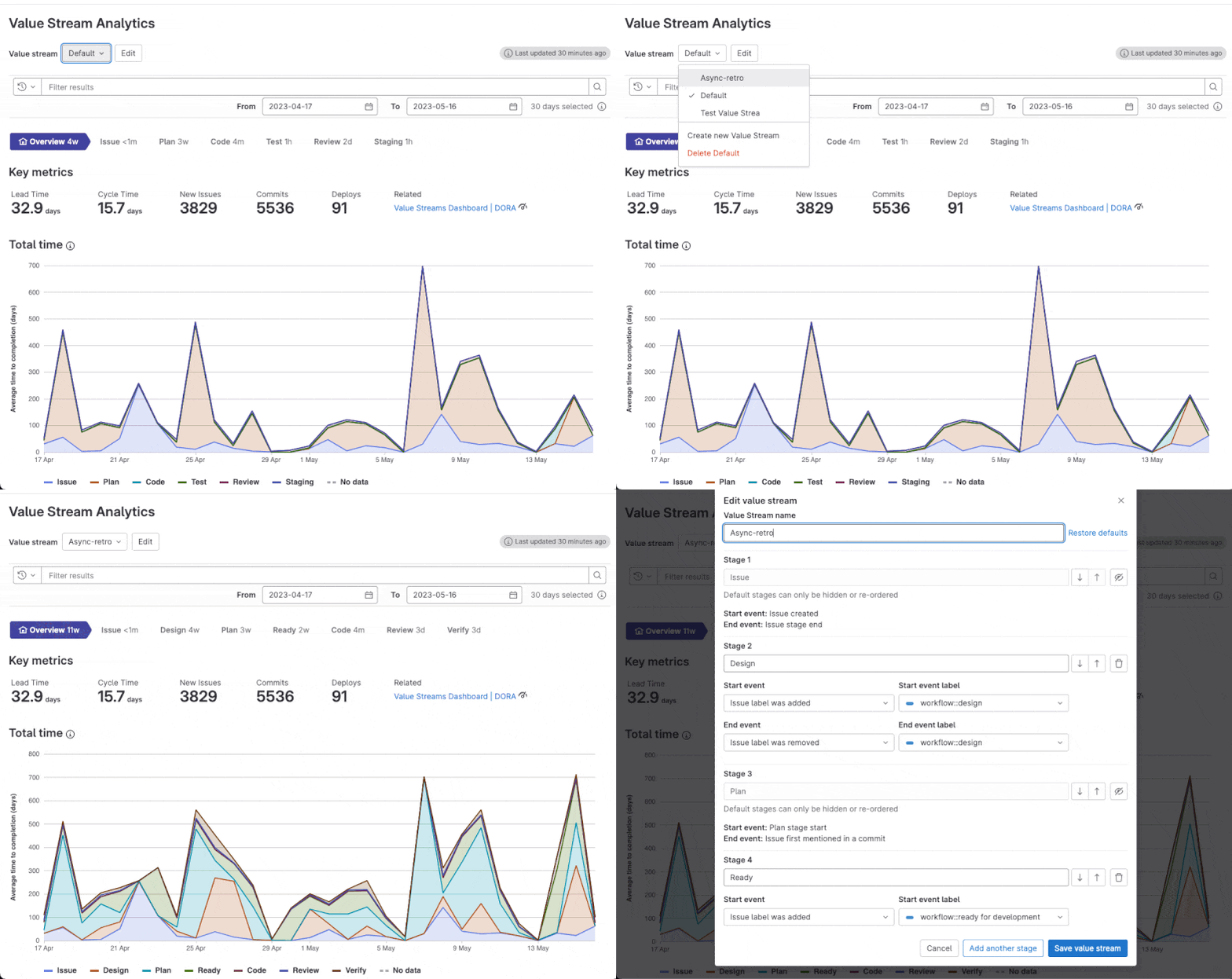
우리는 전체 업무 흐름을 더 잘 볼 수 있도록, 프로젝트 수준의 Value Stream Analytics(VSA)에 Overview stage, custom value streams를 만드는 옵션을 추가하고 있습니다.
지금까지, 이러한 기능은 그룹 수준의 VSA에서만 이용할 수 있었습니다.
인포그랩의 기술지원 서비스를 받으세요!
인포그랩은 GitLab을 사용하는 고객들에게 맞춤 기술 지원을 제공합니다. 최신 버전 업그레이드가 필요하시면 문의하기로 연락 주십시오. 백업/복구 정책은 잘 잡혀 있는지, 시스템에 이상은 없는지, GitLab Runner를 통한 CI/CD 최적화는 되어 있는지를 점검해 드리고 가장 빠르고 안전하게 업그레이드 해드립니다.
(이 포스트는 GitLab의 동의를 받아 공식 블로그의 영문 포스트를 우리말로 번역한 글입니다.)
Tip! 인포그랩의 GitLab 버전별 기능에서 버전별로 추가된 기능을 검색해 볼 수 있습니다.
참고자료
https://about.gitlab.com/releases/2023/05/22/gitlab-16-0-released/
- 👍 Value Streams Dashboard is now generally available
- Upsizing GitLab SaaS runners on Linux
- 👍 GPU-enabled SaaS runners on Linux
- Apple silicon (M1) GitLab SaaS runners on macOS - Beta
- 👍 Comment templates
- Update your fork from the GitLab UI
- Mirror specific branches only
- 👍 New Web IDE experience now generally available
- Remote development workspaces available in Beta for public projects
- Security training with SecureFlag
- Token rotation API
- Al-powered workflow features
- Code Suggestions improvements
- Custom value streams for project-level value stream analytics
Value Streams Dashboard is now generally available
SaaS
Self-Managed
This
Organizations can use the Value Streams Dashboard to track and compare these metrics over a period of time, identify downward trends early, understand security exposure, and drill down into individual projects or metrics to take actions for improvements.
This comprehensive view built as a single application with a unified data store allows all stakeholders, from executives to individual contributors, to have visibility into the software development life cycle, without needing to buy or maintain a third-party tool.

Upsizing GitLab SaaS runners on Linux
SaaS
Self-Managed
You asked, we listened! In our efforts to be best-in-class for CI/CD build speeds, we’re doubling the vCPU & RAM for all GitLab SaaS runners on Linux, with no increase in the cost factor.
We’re excited to see pipelines run faster and boost productivity.

GPU-enabled SaaS runners on Linux
SaaS
Self-Managed
We are aiming to bring the best practices of DevSecOps to data sciences by providing more powerful compute hardware within GitLab runner. Previously, data scientists may have had workloads that were compute-intensive and as a result, jobs may not have been as quickly executed in GitLab.
Now, with GPU-enabled SaaS runners on Linux, these workloads can be seamlessly supported using GitLab.com.
So why wait? Try out the new runner today and let us know what you think in this issue. We can’t wait to hear your feedback!

Apple silicon (M1) GitLab SaaS runners on macOS - Beta
SaaS
Self-Managed
Mobile DevOps teams can now run their entire CI/CD workflows on Apple silicon (M1) GitLab SaaS runners on macOS to seamlessly create, test, and deploy applications for the Apple ecosystem.
With up to three times the performance of hosted x86-64 macOS Runners, you will increase your development team’s velocity in building and deploying applications that require macOS in a secure, on-demand GitLab Runner build environment integrated with GitLab CI/CD.

Comment templates
SaaS
Self-Managed
When you’re commenting in issues, epics, or merge requests you might repeat yourself and need to write the same comment over and over. Maybe you always need to ask for more information about a bug report. Maybe you’re applying labels via a quick action as part of a triage process. Or maybe you just like to finish all your code reviews with a funny gif or appropriate emoji. 🎉
Comment templates enable you to create saved responses that you can apply in comment boxes around GitLab to speed up your workflow. To create a comment template, go to User settings > Comment templates and then fill out your template. After it’s saved, select the Insert comment template icon on any text area, and your saved response will be applied.
This is a great way to standardize your replies and save you time!

Update your fork from the GitLab UI
SaaS
Self-Managed
Managing your fork just got easier. When your fork is behind, select Update fork in the GitLab UI to catch it up with upstream changes. When your fork is ahead, select Create merge request to contribute your change back to the upstream project. Both operations previously required you to use the command line.
See how many commits your fork is ahead (or behind) on your project’s main page and at Repository > Files. If merge conflicts exist, the UI gives guidance on how to resolve them using Git from the command line.

Mirror specific branches only
SaaS
Self-Managed
Do you need to mirror a busy repository with many branches, but you only need a few of them? Limit the number of branches you mirror by creating a regular expression that matches only the branches you need.
Previously, mirrors required you to mirror an entire repository, or all protected branches. This new flexibility can decrease the amount of data your mirrors push or pull, and keep sensitive branches out of public mirrors.

New Web IDE experience now generally available
SaaS
Self-Managed
Since its introduction, we’ve been iterating on the usability, performance, and stability of the Web IDE, which has enabled us to build features like remote development workspaces and code suggestions on a powerful foundation.
We have received overwhelmingly positive feedback on the Web IDE Beta and starting in GitLab 16.0, we are making it the default multi-file code editor across GitLab.

Remote development workspaces available in Beta for public projects
SaaS
Self-Managed
Stop spending hours, or even days, troubleshooting your local development environment and interpreting inscrutable package installation errors. Now you can define a consistent, stable, and secure development environment in code and use it to create on-demand, remote development workspaces.
These workspaces serve as personal, ephemeral development environments in the cloud. By eliminating the need for a local development environment, you can focus more on your code and less on your dependencies. Accelerate the process of onboarding to a new project and get up and running in minutes instead of days.
After the GitLab Agent for Kubernetes is configured and the dependencies are installed in your self-hosted cluster or cloud platform of choice, you can define your development environment in a .devfile.yaml file and store it in a public project. Then, you and any other developers with access to the agent can create a workspace based on the .devfile.yaml file and edit directly in the embedded Web IDE. You’ll have full terminal access to the container, allowing you to work more efficiently. When you’re done, or if something goes wrong, you can shut down the workspace and start a fresh, new workspace for your next development task.
This short video walks you through the lifecycle of a workspace in the current Beta. Learn more about workspaces in the documentation and let us know what you think in the feedback issue.
Security training with SecureFlag
SaaS
Self-Managed
As security shifts left, remediating security findings without guidance can be challenging. Developers need actionable advice so they can resolve vulnerabilities and continue building features. Contextual training that is relevant to the specific vulnerabilty detected was released in GitLab 14.9.
In this release, we are adding an integration with SecureFlag based upon the CWE of the vulnerability. SecureFlag’s training solution is unique in that the labs involve remediating the vulnerability in a live environment, which can be transferred to a real environment.

Token rotation API
SaaS
Self-Managed
Previously, to rotate tokens, the token owner had to manually create a new token and replace the existing token.
Now, token owners can use a :rotate API endpoint to programatically rotate personal, group, and project access tokens.
AI-powered workflow features
stage-badge
SaaS
Self-Managed
GitLab is evolving into an AI‑powered DevSecOps platform. Over the past month, we’ve introduced 10 new experiments to improve efficiency and productivity across various GitLab features, all leveraging AI.
These AI-powered workflows boost efficiency and reduce cycle times in every phase of the software development lifecycle.
Learn more about AI-powered workflows
Code Suggestions improvements
stage-badge
SaaS
Self-Managed
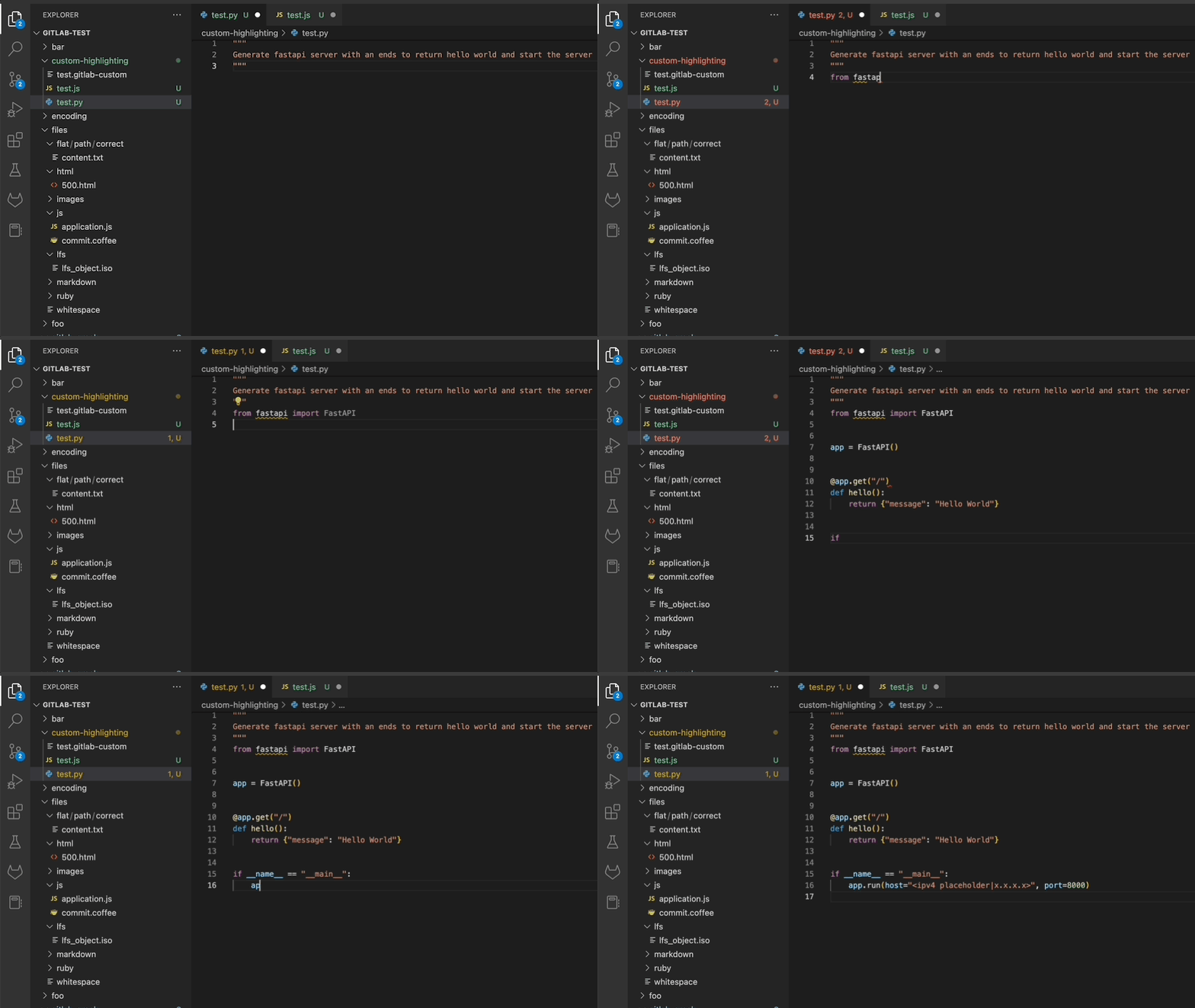
Code Suggestions is now available on GitLab.com for all users for free while the feature is in Beta. Teams can boost efficiency with the help of generative AI that suggests code while you’re developing.
We’ve extended language support from our initial six languages to now include 13 languages: C/C++, C#, Go, Java, JavaScript, Python, PHP, Ruby, Rust, Scala, Kotlin, and TypeScript.
We are making improvements to the Code Suggestions underlying AI model weekly to improve the quality of suggestions. Please remember that AI is non-deterministic, so you may not get the same suggestion week to week.
Read more about these improvements and what’s next.
Custom value streams for project-level value stream analytics
SaaS
Self-Managed
To improve the visibility into the complete workstream, we are adding to the project-level Value Stream Analytics (VSA) the Overview stage and the option to create custom value streams.
Until now, these features were only available at the group-level VSA only.

사전 동의 없이 2차 가공 및 영리적인 이용을 금하며, 온·오프라인에 무단 전재 또는 유포할 수 없습니다.
관련 태그
Grace
Technical Writer
DevOps 도입이 필요하신가요?
인포그랩 전문가가 맞춤 을 도와드립니다.
관련 글

개발 생산성 높이는 10가지 Git 필수 명령어
이 글은 실무에서 자주 사용하고, 협업과 개발 효율을 극대화하는 필수 Git 명령어 10가지를 소개합니다. git rebase, reflog, worktree, bisect, format-patch, am, bundle, archive, commit --amend, clean이 그 내용입니다. 이 명령어는 Git의 버전 관리를 효율화하고, 개발 생산성을 끌어 올리는 데 도움이 됩니다.
2025년 2월 12일
GitLab CI/CD와 Jenkins는 무엇이 다를까?
GitLab CI/CD는 코드 저장소와 CI/CD 프로세스를 단일화하여 협력을 강화하고 효율적인 개발 및 배포를 지원하는 통합된 플랫폼입니다. Jenkins는 많은 플러그인과 확장 기능을 제공하여 다양한 환경과 요구 사항에 맞춤형 CI/CD 파이프라인을 구축할 수 있습니다. 두 도구는 설치, UI/UX, 확장성 등에서 차이가 있으며, 프로젝트의 특성과 요구 사항을 고려하여 선택해야 합니다.
2023년 8월 10일
Git 컨벤션 자동화 가이드
Git 커밋 메시지를 자동화하는 방법에 대한 가이드입니다. Git Hooks를 사용하여 서버와 클라이언트 훅으로 커밋 메시지를 검사하고, Husky와 Commitlint를 사용하여 커밋 메시지를 자동화합니다. 이를 통해 개발자의 부담을 줄이고 건강하고 생산적인 개발 환경을 유지할 수 있습니다.
2023년 5월 25일